
How to Position Subtitles in Sublandia Editor – Step-by-Step Guide
Designed for creators. Free to use. Ready to scale.
Built by subtitlers. Powered by freedom!
Introduction
By default, subtitles in Sublandia Editor are displayed at the Bottom Center of the screen.
This position is suitable for most video content, but sometimes you may need to adjust subtitle placement for better readability, on-screen graphics, or multiple subtitle tracks.
Sublandia Editor allows you to easily reposition subtitles using the positioning panel, giving you full control over your subtitle layout.
 Step-by-Step Guide
1. Open your project
Open your project in Sublandia Editor and select the subtitle you want to reposition. You can select it either from the subtitle table or directly on the waveform view.
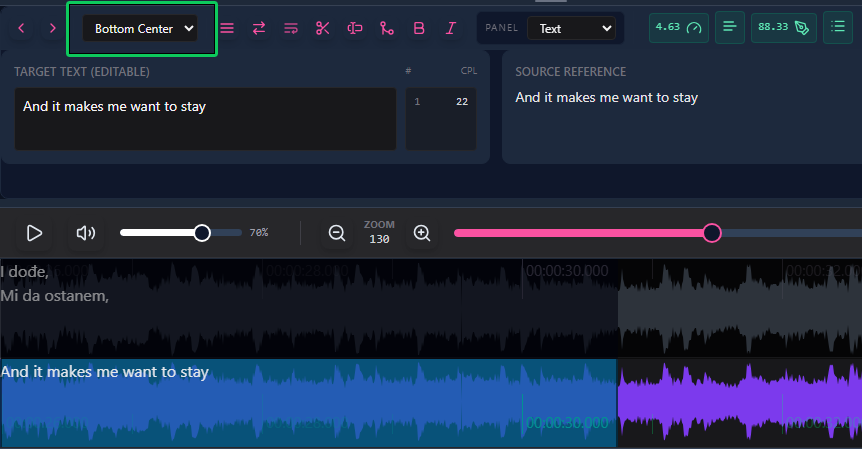
2. Adjust the subtitle position
Adjust the subtitle position:
- In the Positioning Panel, the default position is Bottom Center.
- Click the panel and choose your preferred position. Sublandia Editor provides 9 predefined positions combining Top, Middle, Bottom with Left, Center, Right.
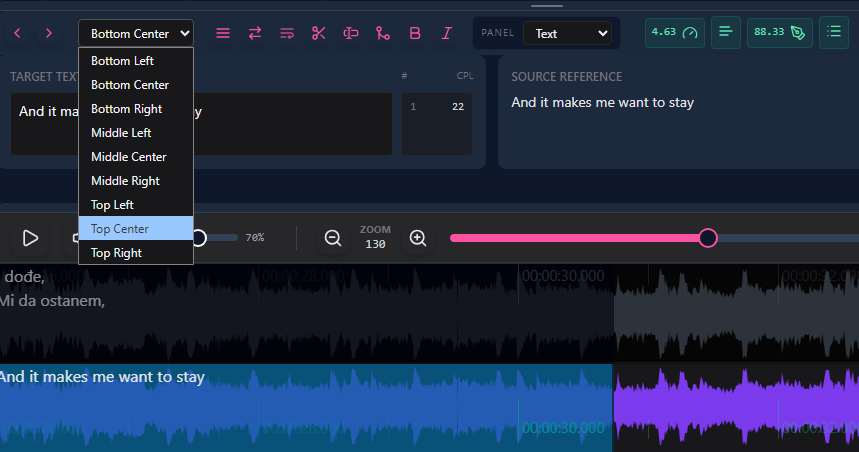
3. That’s it!
The subtitle will immediately update to the new position.
Tip
For videos with multiple elements, make sure subtitles do not overlap on-screen graphics or other text.
 FAQ
FAQ
What is the default subtitle position in Sublandia Editor?
Subtitles are by default displayed at Bottom Center.
How many positions can I choose from?
There are 9 predefined positions combining Top, Middle, Bottom with Left, Center, and Right.
Can I reposition multiple subtitles at once?
Currently, subtitle positioning is applied per subtitle line.
Will changing subtitle position affect export formats?
Yes, the selected position is preserved during export in formats that support positioning.
Is repositioning suitable for professional subtitling workflows?
Absolutely. Adjusting subtitle position ensures readability and avoids conflicts with on-screen visuals, making your subtitles professional and polished.
Something on your mind?
Contact us
We are social


