 Sublandia Editor: Real-time Subtitle Validation and Faster Workflow for Professionals
Sublandia has launched its new subtitle editor, Sublandia Editor, revolutionizing the way professionals handle subtitles. Key features include real-time QC, dual timeline view, and pre-configured project profiles that save time and increase efficiency.
 Real-time Subtitle Validation
What It Does
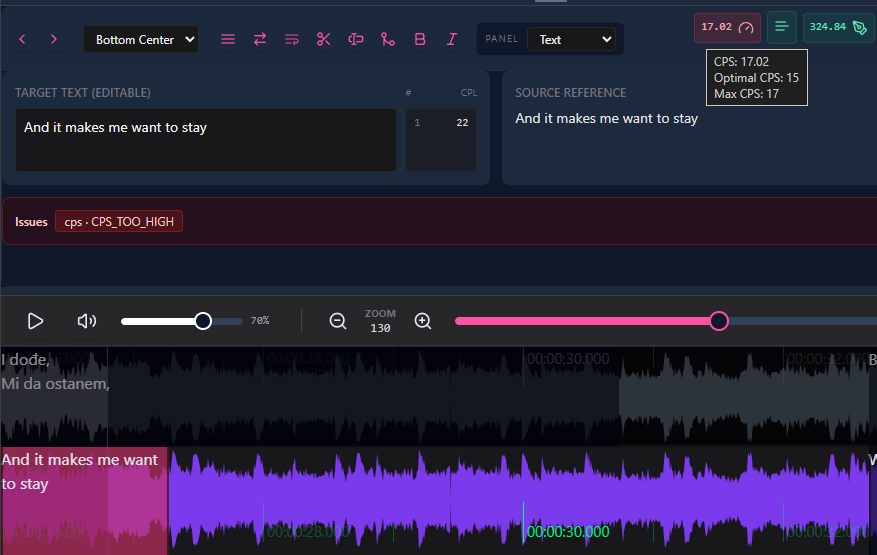
One of the standout features of Sublandia Editor is real-time subtitle validation. While typing or moving subtitles, the editor instantly highlights any issues without needing a separate QC step.
Traditional workflow:
edit export QC correction
Sublandia workflow:
edit QC simultaneously
Errors Detected in Real-time
The system automatically flags:
- Timing conflicts
- Overlong lines
- CPS (characters per second) violations
- Formatting errors
- Encoding issues
Why It’s Faster
Real-time validation speeds up work because:
- Errors are visible immediately
- Workflow is uninterrupted
- Fewer micro-corrections later
Dual Timeline and Dual Language View
Overview
The dual timeline + dual language view allows simultaneous monitoring of:
Source subtitles
Translated subtitles
Waveform visualization
Timing tables
All this is visible without constantly switching windows, making it perfect for dense dialogue and fast spotting.
 Project Profiles: CPS, CPL, and Framerate Pre-configured
Sublandia Editor includes pre-configured project profiles for different subtitle standards. You can choose a profile and start working immediately without manual setup.
Users can also save custom profiles for consistent standards across projects.
FAQ
What is real-time subtitle validation?
It automatically checks subtitles while you type or move lines, instantly detecting timing conflicts, overlong lines, CPS violations, formatting, and encoding errors.
How does dual timeline view improve workflow?
It allows simultaneous viewing of source and translated subtitles, waveform, and timing tables, reducing window switching and speeding up spotting.
Is Sublandia Editor suitable for fast subtitle production?
Absolutely. Real-time QC, dual timeline view, and pre-configured profiles significantly reduce micro-corrections and accelerate the entire workflow.
Something on your mind?
Contact us