 Export and Import Subtitle Projects in Sublandia Editor
Because Sublandia Editor runs entirely inside a browser, project data is stored locally in browser storage during active work.
If browser memory is cleared, cached data removed, or local storage reset, projects that were not exported may no longer be available for loading inside the editor.
To prevent data loss and allow full project continuity, Sublandia Editor includes project export and import functionality through the .subpro project format.
The .subpro file preserves complete project data so work can be restored instantly at any time.
 Why Browser-Based Projects Should Be Exported Regularly
Browser-based subtitle editing offers speed and privacy, but local browser storage is not permanent.
What Happens When Browser Storage Is Cleared
If browser cache, storage, or local data is removed:
- active subtitle projects disappear from browser memory
- project settings are removed
- local project references are no longer available
This affects projects that have not been exported.
Why Export Is Important
Regular project export creates a safe backup that can be reloaded whenever needed.
This is especially important for:
- long subtitle projects
- ongoing translation work
- professional subtitle delivery workflows
What the .subpro Project File Contains
The .subpro file is a full project package.
Included Project Data
When exporting a project, the file preserves:
- subtitle content
- video reference
- templates
- subtitle timing
- subtitle rulesets
- project settings
- technical configurations
Full Project Continuity
After import, all saved project data appears immediately inside the editor and work can continue without rebuilding the project manually.
How to Export a Subtitle Project
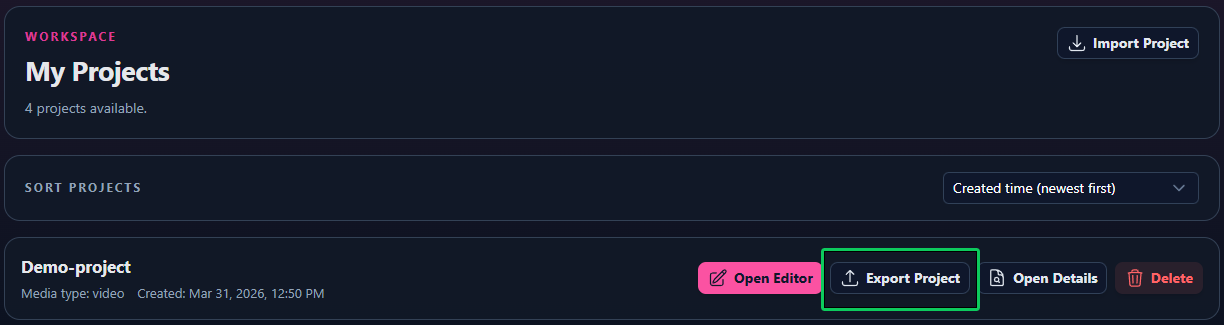
Option 1 – Export from Dashboard
Open Dashboard Find Your Project Click Export Project Click on Export .subpro
Option 2 – Export in Sublandia Editor
Click on Export Project Package Click on Export .subpro
The file is then saved locally on your device.
For long projects, it is recommended to keep backup copies of .subpro files.

How to Import a .subpro Project File
Step 1 – Open Dashboard
Click on Import Project
Step 2 – Select the .subpro File
Locate the saved .subpro file on your device.
Step 3 – Load the Project
After import, the full project appears automatically.
All subtitle content, settings, and project structure are restored immediately.
 Subtitle Export Files Are Also Saved Locally
In addition to full project export, subtitle export files are stored locally.
Subtitle Export Goes to Downloads
When subtitle files are exported, they are saved in the browser download location.
This applies to exported subtitle formats such as:
- SubRip
- Timed Text Markup Language
- Distribution Format Exchange Profile
Exported Subtitle Files Can Be Loaded Again
Previously exported subtitle files can be re-imported into the editor for continued work.
Why .subpro Is Better for Full Project Recovery
Subtitle export formats save subtitle text and timing, but they do not preserve full project structure.
Subtitle Files Do Not Include Full Project Context
Standard subtitle exports usually do not preserve:
- templates
- project settings
- rulesets
- internal editor configuration
.subpro Preserves Full Production State
The .subpro format restores the project exactly as it was during export.
Project Safety in Browser-Based Subtitle Editing
Sublandia Editor uses client-side architecture for privacy and speed, but local project management remains the user's responsibility.
Project export ensures work remains protected beyond browser storage limits.
 FAQ – Subtitle Project Export and Import
-
What happens if browser memory is cleared?
- Projects stored only in browser memory may no longer be available.
-
What is a .subpro file?
- A .subpro file is a full project backup containing subtitle data, video references, templates and settings.
-
Can I continue working after importing a .subpro file?
- Yes. The project loads immediately and work can continue normally.
-
Are subtitle export files saved locally?
- Yes. Exported subtitle files are stored in the Downloads folder.
-
Can exported subtitle files be imported again?
- Yes. Exported subtitle files can be reloaded into the editor.
-
Is .subpro better than subtitle export for backup?
- Yes. .subpro preserves complete project state.
Something on your mind?
Contact us